Give your coding agent a map of your codebase. 2-4x cheaper, no missed files.
Wingbox builds the code graph of your repository on your machine and tells an AI coding agent, in a few hundred tokens, what a change will break before it edits. Open source (MIT), fourteen languages and frameworks.
$ pipx install wingbox && wingbox installSee it in action
One command, one exact answer. The agent asks which files depend on the one it is about to edit; Wingbox answers from the code graph instead of reading the repository.

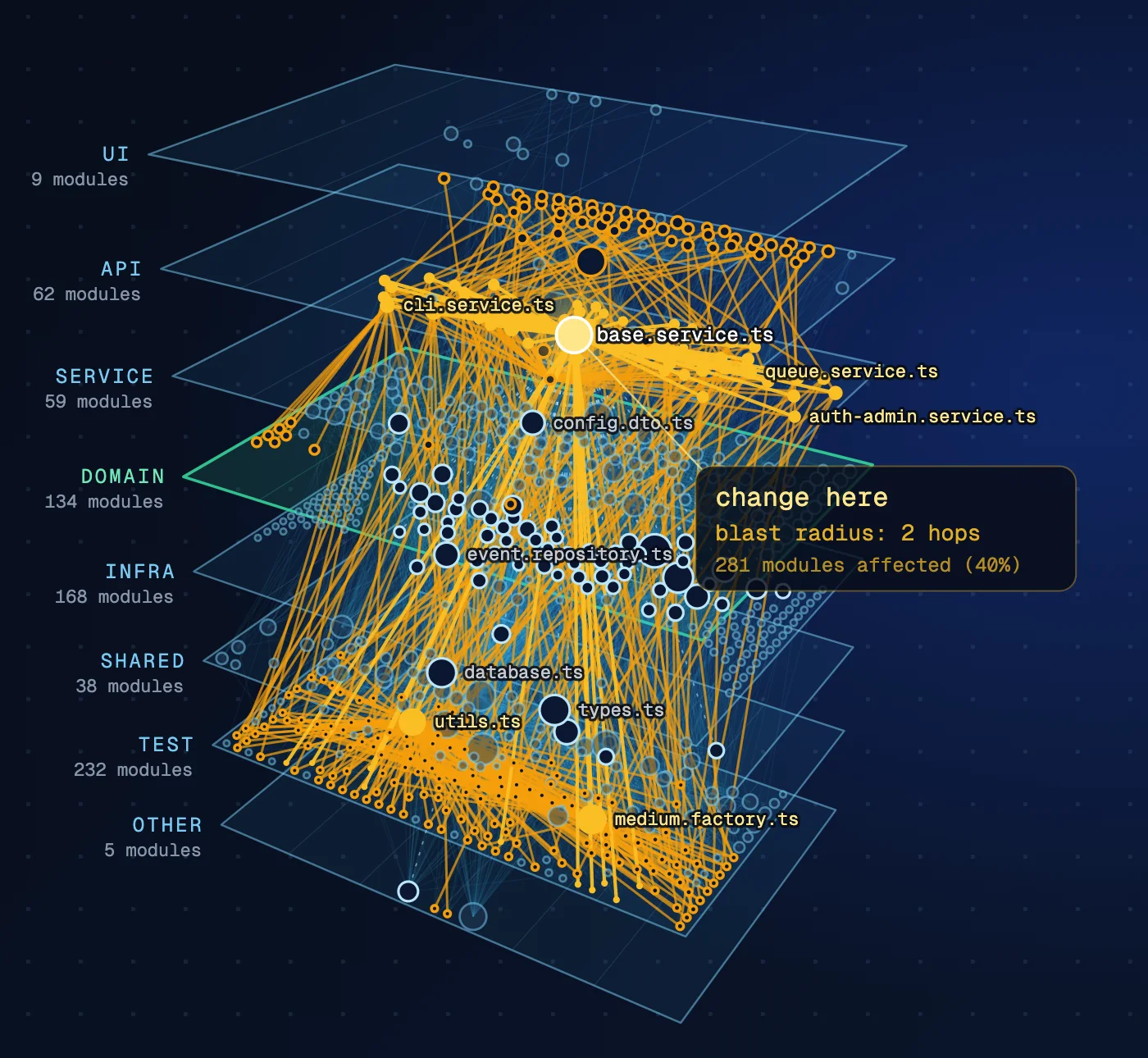
Your architecture, in 3D layers
The build also writes an interactive map: one HTML file that opens in a browser without a network connection. The layers view stacks API, services, domain and infrastructure; click a file and its blast radius lights up across the layers.
What it answers
What could break if I change this file?
Which modules depend on this service, class or type?
Where is this function used, line by line, before I rename it?
Does this dependency cross an architecture boundary?
Where does this new code belong in the architecture?
Which two or three files should I read before fixing this bug?
Run it on your repository
- 1
$ pipx install wingbox && wingbox installOn macOS, Linux or Windows: install the command, then put Wingbox in place for every coding assistant on the machine: Claude Code, Codex, Gemini CLI, Cursor and GitHub Copilot. As a plugin: in Claude Code /plugin marketplace add aileron-tech/wingbox, then /plugin install wingbox@aileron-tech; in Codex codex plugin marketplace add aileron-tech/wingbox, then codex plugin add wingbox@aileron-tech. Skill only: npx skills add aileron-tech/wingbox.
- 2
$ wingbox build .Build the graph. Everything Wingbox writes goes into one folder, .wingbox/: the index, the report and the map; wingbox open opens the map. In Claude Code it then keeps itself fresh: a hook marks each edited file, and before the next search only the changed files are patched in, about 1 s for one file on FastAPI. Changes made by git or an editor are found too.
- 3
$ wingbox impact path/to/file 2Ask what a change to one file reaches within two hops.
How it works
- Everything runs on your machine: no LLM call, no embeddings, no network access to build or query the graph
- Deterministic static parsing: the same code gives the same graph
- Python, TypeScript, Rust, C#, Java, Go, Ruby, Rails, PHP, Laravel, Dart, Flutter, Free Pascal and Lazarus
- An agent skill for Claude Code, Codex, Gemini CLI, Cursor and GitHub Copilot, an MCP server for any MCP client, and a plain command for people
Wingbox is the engine behind Agent Control, our fixed-price audit of agent-written code.